FretTime's Unexpected Open-Graph Adventure
- Stacy Bridges
- Frettime , Web development
- July 31, 2025
Table of Contents
FretTime’s Unexpected Open-Graph Adventure
July 31, 2025
What Happened to My Sprint?
Several days ago, I was pumped. FretTime Phase 2 was officially underway with an ambitious 14-day roadmap: Global Focus Timer, Analytics Dashboard, Drag & Drop, Enhanced Timer Intelligence. The works.
Then I decided to share my app as a project on LinkedIn.
You know that moment when you paste a URL into a social media post, expecting a nice preview card to appear, and instead you get… nothing? Just a plain text link? What was going on?
After poking around a bit, I ended up on LinkedIn’s Post Inspector. To my surprise, when it crawled my FretTime URL, it came back with nothing.
“We can’t find any meaningful metadata on your site.”
Huh? That can’t be right. So, I checked the Inspector against the FretCandy blog as well, and I got the same result. Nothing.
Basically, FretTime and FretCandy were both invisible to social media crawlers. No preview cards, no images, no descriptions. Just naked URLs.
I decided the analytics dashboard could wait. Not being able to share on social media was a bigger fish. Obviously, there were a few things I didn’t know. It was time for me to learn about Open Graph.
What is Open Graph?
As I learned, Open Graph is a protocol that lets you control how your content appears when it’s shared on social-media platforms. It’s like your site’s business card for the social web.
When you share a link on LinkedIn, Twitter, or Facebook, these platforms send crawlers to your site looking for specific metadata tags. These tags tell the platform what title, description, and image to display in the preview card.
Without Open Graph tags, you’re leaving it up to the social platform’s algorithm to guess what your site is about. Sometimes it works. Often it doesn’t. In my case, it failed completely because I didn’t have my site set up for Open Graph.
Here’s what I was missing:
<meta property="og:title" content="FretTime | Practice Time Made Simple" />
<meta
  property="og:description"
  content="Modern guitar practice organization app..."
/>
<meta property="og:image" content="https://frettime.com/og-image.png" />
<meta property="og:url" content="https://frettime.com" />
<meta property="og:type" content="website" />
Simple tags. Massive impact.
The Benefits of Being OG First
After spending a few days in metadata rabbit holes, I learned that Open Graph should be part of my initial site setup, not an afterthought. Here’s a few reasons why:
Professional Credibility – Proper social media previews can signal that my project matters. It can make the difference between looking like a side project versus a real product.
Better Engagement – Posts with rich preview cards can get significantly more clicks and shares. People trust links that show them what they’re clicking on.
Brand Control – I get to decide exactly how my content appears across social platforms. No more hoping the algorithm picks the right image or description.
SEO Benefits – While Open Graph is primarily for social media, search engines also use this metadata to better understand site content.
Future-Proofing – Once it’s set up properly, every page automatically generates appropriate social cards. No more manual work for each post or feature.
The time investment pays for itself immediately, and keeps paying dividends with every share.
Including Core Tags and Images
Setting up Open Graph varies depending on the tech stack, but the core principles remain the same.
For a React/Next.js Project (like FretTime), I found that I could handle everything in my layout.tsx:
export const metadata: Metadata = {
  title: "FretTime - Guitar Practice Organization Made Simple",
  description:
    "A modern web application designed specifically for guitarists...",

  openGraph: {
    title: "FretTime | Practice Time Made Simple",
    description: "Modern guitar practice organization app built with React...",
    url: "https://frettime.com",
    siteName: "FretTime",
    images: [
      {
        url: "https://frettime.com/frettime-og-image.png",
        width: 1200,
        height: 630,
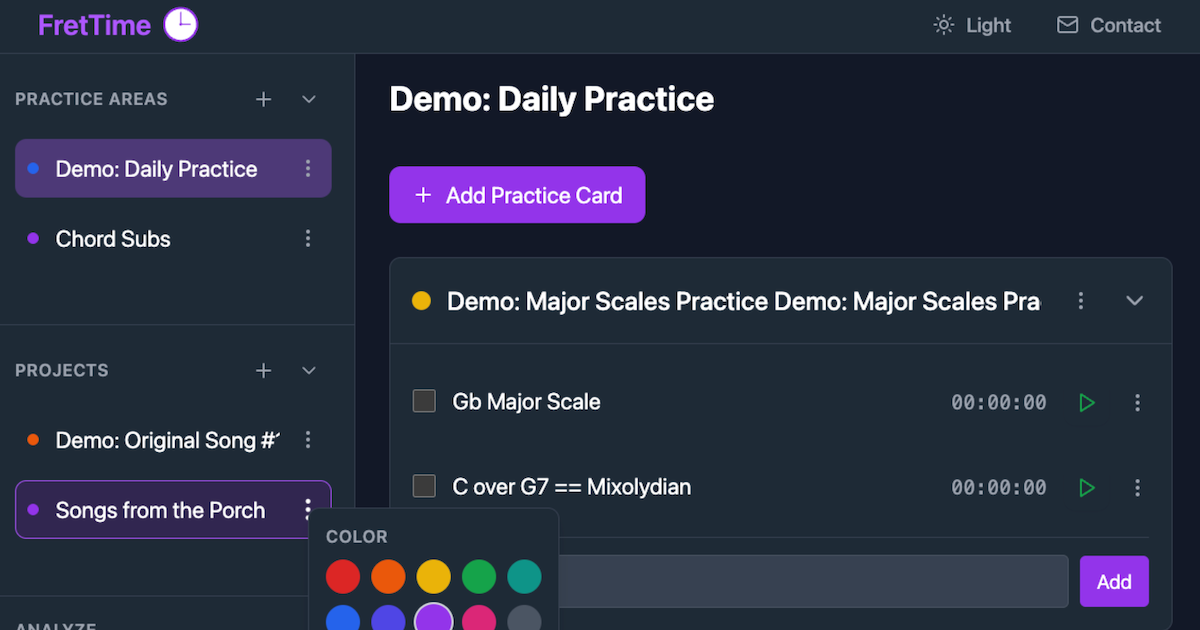
        alt: "The FretTime app interface showing practice areas and timers",
      },
    ],
    locale: "en_US",
    type: "website",
  },
};
For Hugo Sites (like FretCandy), it can be more involved. In my case, I needed to update my head partial, create a basic-seo partial, and configure my hugo.toml. The Hugo approach definitely required more template logic, but it seemed to give me fine-grained control over the different content types. But what a pain! To be honest, it gave me another reason to hate Hugo.
The Image Challenge – I found that creating effective Open Graph images is also crucial. The standard size is 1200x630 pixels, and the image needs to look good at thumbnail size while clearly representing the brand. I used Canva to create custom-sized, pixel-dense designs for both FretTime and FretCandy.
Pro Tip: Don’t forget your Twitter Card tag (twitter:card)! While many platforms read Open Graph tags, Twitter prefers its own twitter:card metadata for optimal display. That being said, once I got my tags set up, including the twitter:card tag, I found that my OG image still won’t show up on X.
Test Your Tags
So, here’s where I learned the hard way that implementation is only half the battle. Testing is everything.
LinkedIn Post Inspector (https://www.linkedin.com/post-inspector/) – The most finicky of the bunch? LinkedIn caches aggressively, so changes can take time to appear.
Twitter Card Validator (https://cards-dev.twitter.com/validator) – Clean interface, fast updates, helpful error messages… but where did the preview go? I found out that everything can look right on the validator (all green with no fails), but the images may still not show up in an X post, or they may show after significant latency.
Facebook Sharing Debugger (https://developers.facebook.com/tools/debug/) – Great for debugging what Facebook’s crawler actually sees.
Each platform has its quirks, but so might the hosting platform. For instance, LinkedIn seemed particularly stubborn at first, but the primary reason was that Netlify was blocking their site crawler by default, which required me to add a robots.txt file:
User-agent: LinkedInBot
Allow: /
Another quirk of the Netlify platform is that it may apply minification by default to your site as part of its build post-processing. The problem for metadata is that the minification can actually cause quotes to get stripped from metadata attributes. (In my case, my initial Hugo setup for FretCandy included minification as part of the seminal build script, which was causing the quote stripping I mentioned. As a result, I had to manually remove minification from my package.json build script).
Testing tip: Clear cache and test from different devices. What works on desktop might not work on mobile, and cached results can hide real problems.
Example Tag Setup for FretTime
Here’s the complete Open Graph setup I implemented for FretTime, including Twitter Cards and structured data:
// Core metadata
title: 'FretTime - Guitar Practice Organization Made Simple',
description: 'A modern web application designed specifically for guitarists and string musicians...',

// Open Graph tags
openGraph: {
  title: 'FretTime | Practice Time Made Simple',
  description: 'Modern guitar practice organization app built with React, Next.js, TypeScript...',
  url: 'https://frettime.com',
  siteName: 'FretTime',
  images: [{
    url: 'https://frettime.com/frettime-og-image.png',
    width: 1200,
    height: 630,
    alt: 'The FretTime app interface for organizing practice time',
    type: 'image/png',
  }],
  locale: 'en_US',
  type: 'website',
},

// Twitter Card optimization
twitter: {
  card: 'summary_large_image',
  title: 'FretTime | Practice Time Made Simple',
  description: 'Modern guitar practice organization app built with React...',
  images: ['https://frettime.com/og-image.png'],
},

// Structured data for search engines
authors: [{ name: 'Stacy Bridges', url: 'https://www.linkedin.com/in/stcybrdgs/' }],
keywords: ['guitar practice app', 'music organization software', 'React portfolio project'],
The result? Nice preview cards across all platforms, and professional-looking shares that can actually help to drive traffic.
Back on Track
So, now both FretTime and FretCandy are setup to generate nice social media cards. LinkedIn recognizes them instantly. Twitter (X) likes the descriptions but bails on the previews. Facebook pulls the right images and descriptions. After a bunch of updates and dumpster diving, it still seems to be a mixed bag.
Was this the analytics dashboard I planned to build this week? Definitely not. Was it time well spent? Yep.
Phase 2 is officially back on track and social-media ready (or perhaps I should say “readier”) with proper Open Graph metadata as an unexpected but valuable addition to the overall project setup.
Music + code, let's go! 🎸🚀
Follow along on X [@stcybrdgs] for more adventures in building FretTime, plus the occasional detour into unexpected web development rabbit holes.